

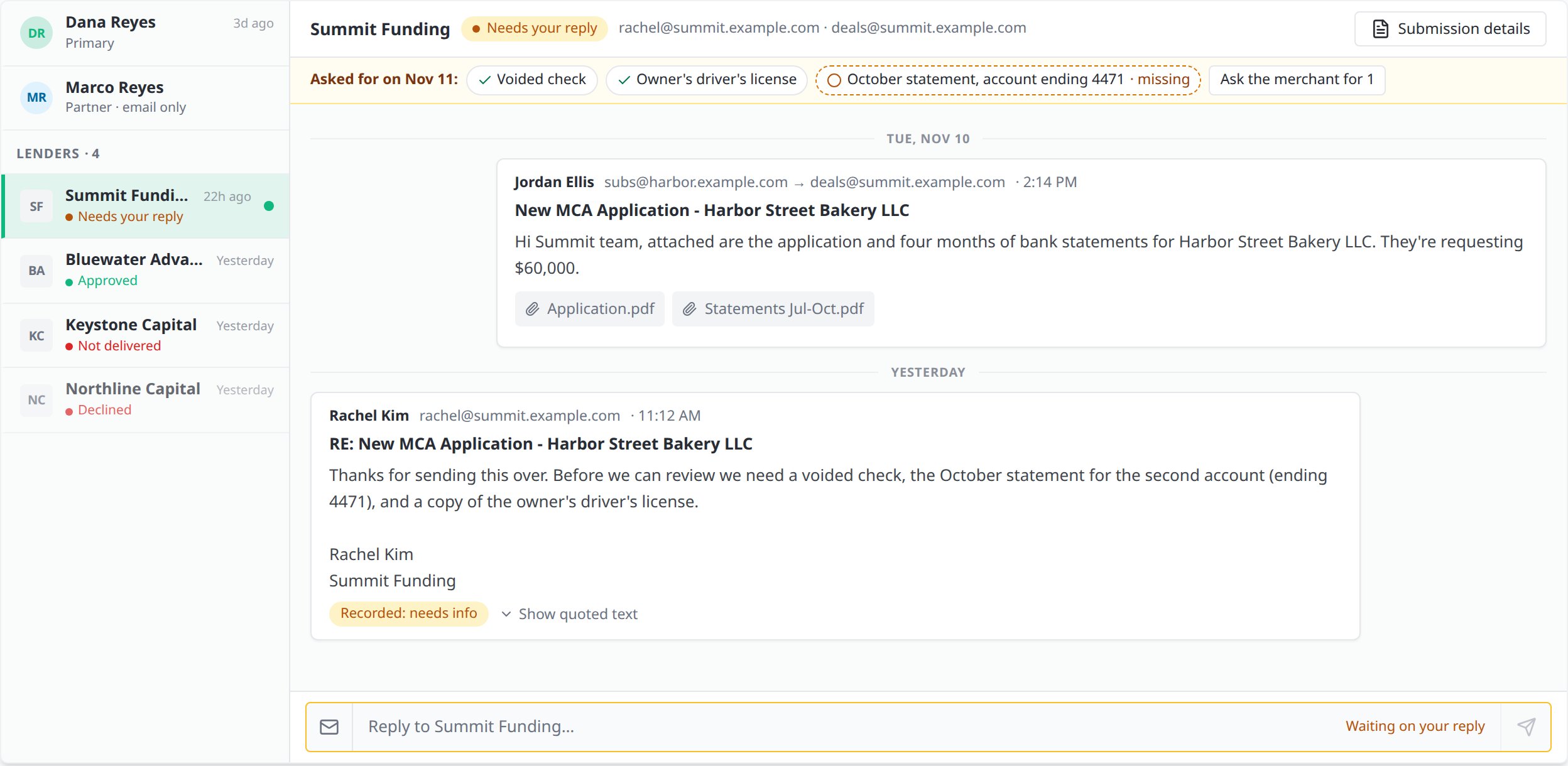
A lender's thread on the deal's Conversation tab.
Where to find it
Open the deal and click the Conversation tab. Under the merchant’s contacts, Lenders lists each lender the deal was emailed to, with where it stands:- Needs your reply: the lender asked for more information.
- Sent, Approved, Declined: the submission’s status.
- Not delivered: the email bounced. See Not delivered below.
Reading the thread
The thread is read straight from the mailbox the deal went from, so it has everything in that conversation: your submission, each reply from anyone at the lender, and emails your team sent from Gmail or Outlook directly. Nothing is copied into NextLevel MCA; the mailbox stays the source.- Each email looks the way it did in your inbox: its formatting, tables, logos and pictures. An offer a lender pasted into the email as a screenshot shows right there.
- Earlier messages quoted under an email are folded away. Click Show quoted text to read them.
- Links in an email work as they do in your inbox, for example a portal link to enter balances or upload documents. They open in a new browser tab. Hover over one to see where it goes.
- Attachments show under the email with their name, type and size, for example a lender’s offer as a PDF. Click one to download it. Pictures already shown inside the email aren’t listed again.
- A pill such as Recorded: needs info or Recorded: offer shows what NextLevel MCA took from that email.
- Needs a look on an email means NextLevel MCA wasn’t sure what to do with it, and says why. Update the submission the way the email calls for, or click Mark handled if there’s nothing to change. See How replies are read.
- Submission details opens the submission’s facts and its activity trail, without leaving the thread.
Answering a lender
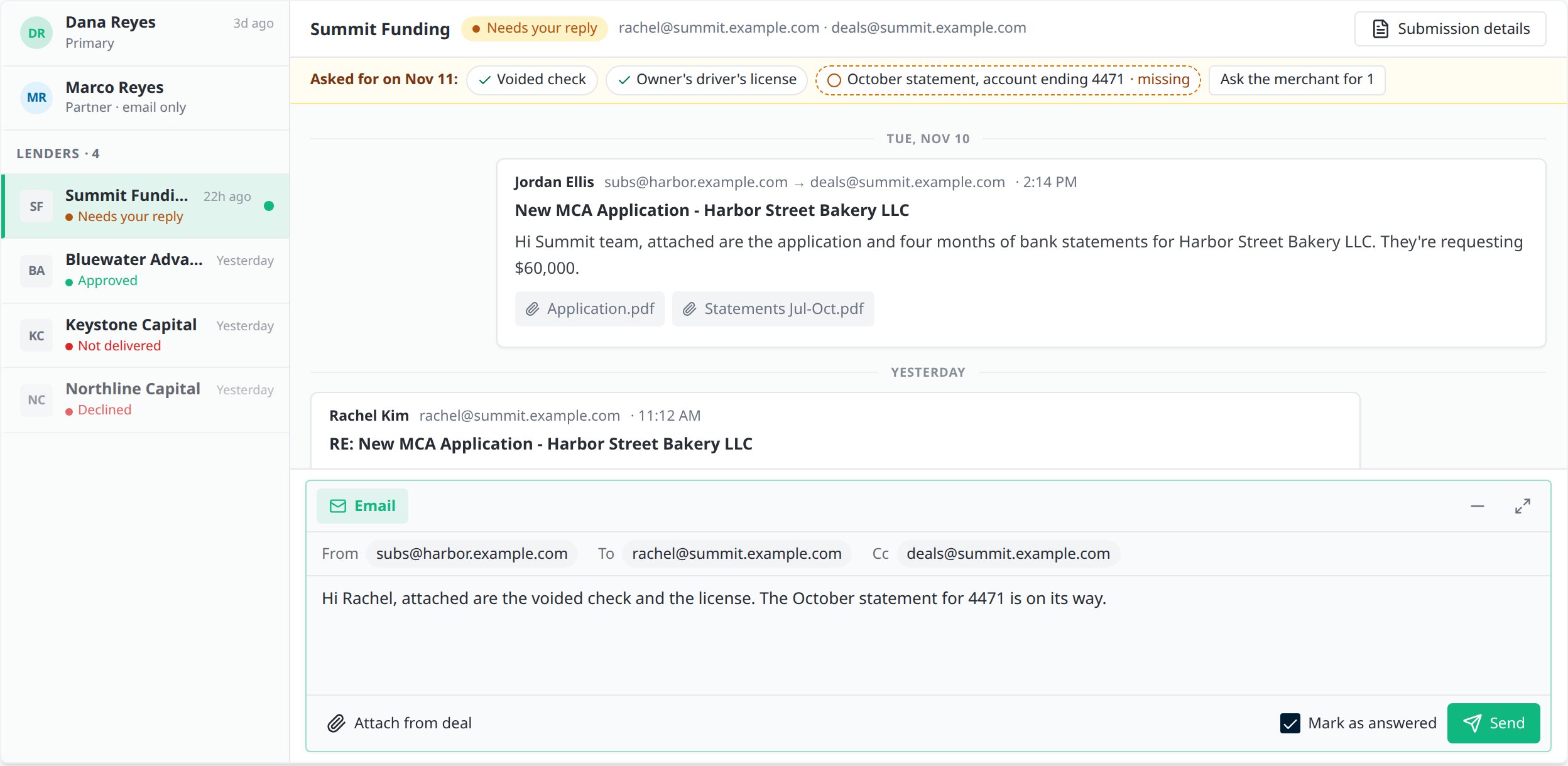
The reply box, opened.
1
Open the reply box
Click Reply to the lender at the bottom of the thread. It shows who it goes to: To is the person at the lender who wrote last, and anyone else on the thread is copied. From is always the mailbox the deal went from, so the lender gets it in the same conversation.
2
Write and attach
Type your answer. Attach from deal lists the deal’s documents; tick the ones to send. PDFs carry the submission’s document reference, and bank statements go as their watermarked copies, the same as in the original package.
3
Mark as answered, then send
When the lender asked for more information, Mark as answered is ticked: sending moves the submission back to Sent. Untick it to keep it on Needs info. Click Send, or press Ctrl + Enter (⌘ + Enter on a Mac).
Getting what’s missing from the merchant
When the strip shows something missing, click Ask the merchant. The Request documents window opens with the missing items already ticked, worded as the lender asked, and the request is tied to that lender. Send it by text, email or a link as usual, see Requesting documents. When the merchant uploads everything, whoever asked gets a notification that the merchant sent what the lender asked for. It opens the lender’s thread with the reply ready: the new documents attached and a first line written. Read it, change what you like, and send it. Nothing goes to the lender until you click Send.Not delivered
When the email to a lender bounces, for example because its address is mistyped or no longer in use, the lender shows Not delivered and the thread says the lender never got it. Fix the lender’s submission address on the lender’s page, then resubmit the deal to that lender. A reply never goes to the bounce or to a lender’s no-reply address.Common problems
The deal has no Lenders section
The deal has no Lenders section
Only lenders the deal was emailed to from a connected mailbox are listed. A deal sent only through lenders’ APIs, recorded with Record Submission, or not sent yet has no email thread to show. Deals emailed before September 2026 went out the old way: they show what NextLevel MCA kept, without a reply box.
It says to reconnect a mailbox
It says to reconnect a mailbox
The mailbox the deal went from is disconnected. The thread shows what NextLevel MCA kept, and replying waits until it’s reconnected under Settings → Senders, see Connecting a mailbox. A reply never goes from a different mailbox: the lender would get it outside the conversation.
The reply went as a new email
The reply went as a new email
The email you answered was deleted from the mailbox, so there was nothing to reply to. The reply still goes to the lender, with the thread’s subject, as a new email.
I can read the thread but not reply
I can read the thread but not reply
Replying needs permission to submit deals. Ask an admin to give it to you in Settings → Team.