

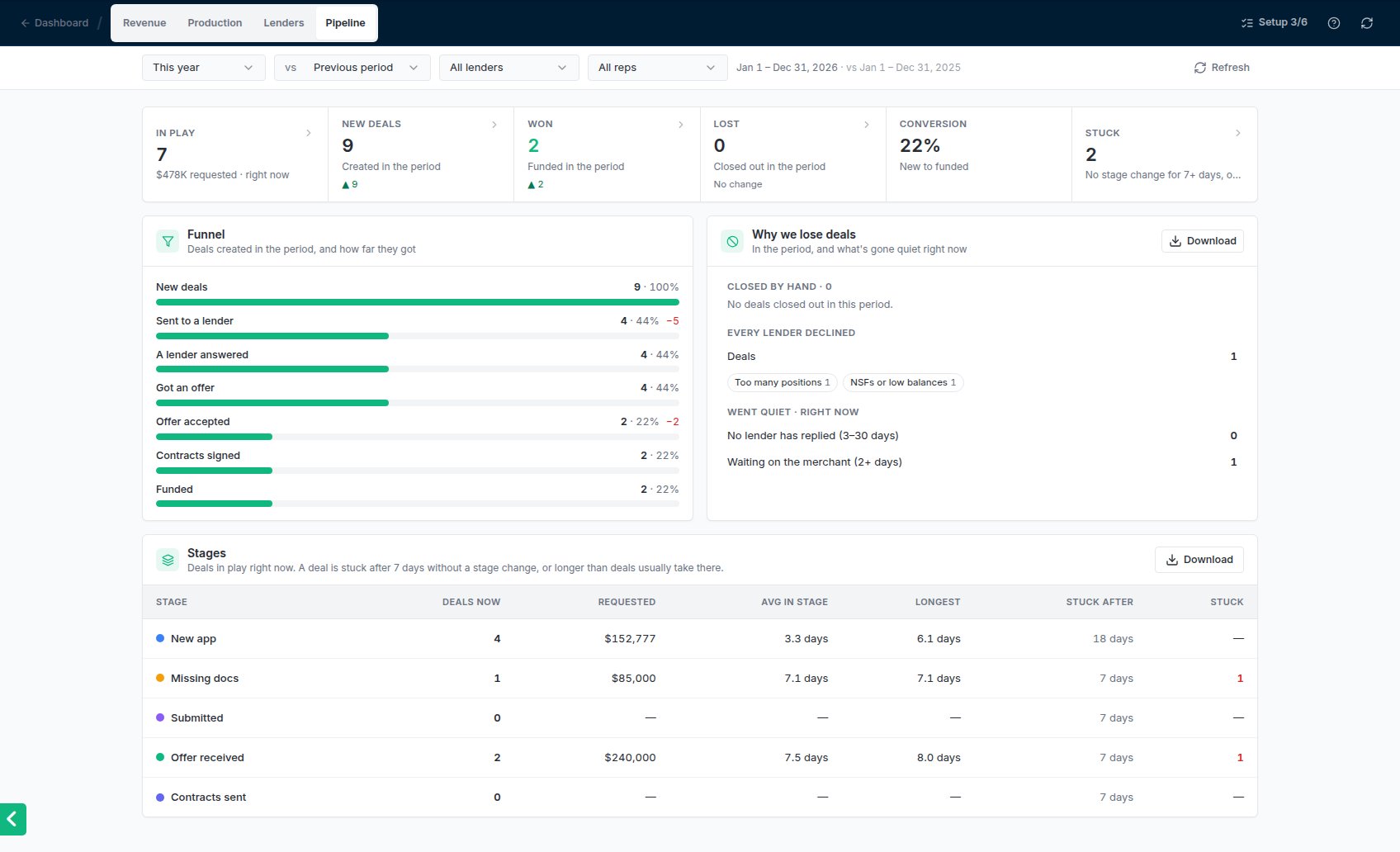
The Pipeline report: the figures, the funnel, Why we lose deals, and Stages.
The figures
Click a figure to list the deals behind it. Stuck lists the oldest first, with the days in stage in red.
Funnel
The funnel follows the deals created in the period and shows how many reached each step: Sent to a lender, A lender answered, Got an offer, Offer accepted, Contracts signed and Funded. Each step shows its share of the new deals, and in red how many dropped off since the step before. Click a step to list the deals that reached it.Why we lose deals
- Closed by hand: deals closed out in the period, counted by the reason picked when they were closed. Click a reason to list its deals; hover over the reason in that list to read the note.
- Every lender declined: deals where every lender they went to declined, the last decline in the period, with the lenders’ decline reasons as chips. See Lenders report for the reasons.
- Went quiet, right now: deals in play where no lender has replied for 3 to 30 days, and deals waiting on the merchant for 2 days or more: an open document request, or an offer shared with them that they haven’t answered.
Stages
One row per stage, for the deals in play right now: Deals now, the amount Requested, the Avg and Longest time in the stage, Stuck after and how many are Stuck. Stuck after is 7 days, or how long deals usually take to leave that stage when that’s longer: the time within which 3 in 4 deals moved on, once at least 5 have. Click a stage to list its deals, oldest first, or click its red Stuck count to list only the stuck ones.Common problems
Lost deals show under No reason recorded
Lost deals show under No reason recorded
Those were closed out before October 2026, when picking a reason became required.
A deal that's moving shows as stuck
A deal that's moving shows as stuck
Stuck goes by stage changes. A deal whose submissions and offers are moving but whose stage hasn’t changed in 7 days counts as stuck. Move it to the stage it’s really in, or bind your stages to events so they move on their own; see Pipeline stage events.