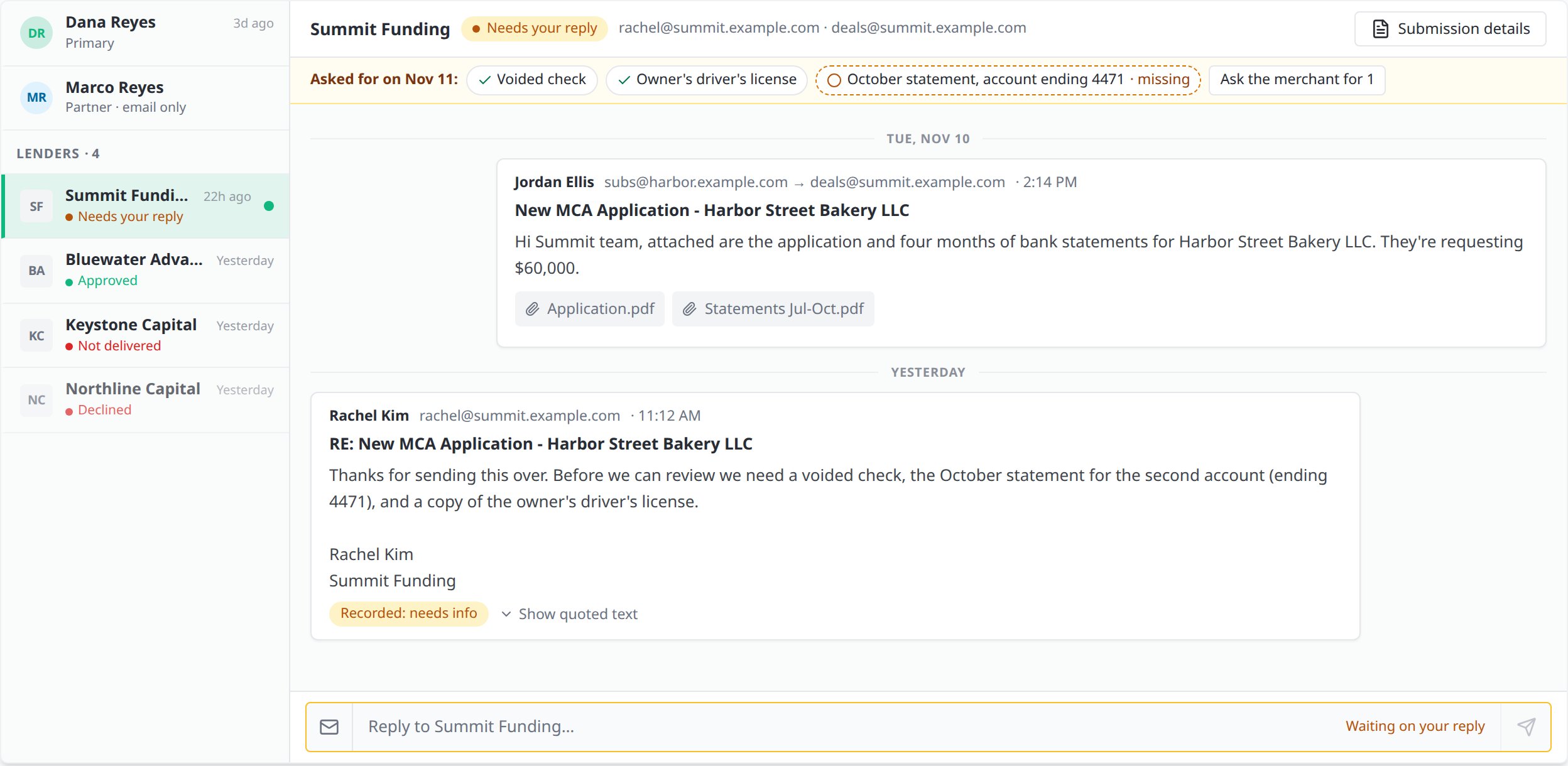
Every lender you email a deal to now has its email thread on the deal’s Conversation tab, under Lenders, and you can answer it right there. The reply goes from the mailbox the deal went from, in the same thread, so the lender sees one conversation.
The whole thread, read straight from your mailbox: your submission, each reply from anyone at the lender, and emails your team sent from Gmail or Outlook directly. A lender that asked for more information says Needs your reply, and one that has written since anyone opened its thread shows in bold.
What the lender asked for, item by item, marked on file or missing. Ask the merchant sends a document request for the missing items in the lender’s own words. When the merchant has sent everything, you get a notification and your reply to the lender is ready with the documents attached.
Attach from the deal: PDFs carry the submission’s document reference and statements go as their watermarked copies. Mark as answered moves the submission back to Sent.
Not delivered when the email to a lender bounced, so a wrong address doesn’t go unnoticed.
You can also reply from the Submissions tab: Reply to on a lender that asked for more information, or Open for the details with the thread. Reading needs access to submissions; replying needs permission to submit deals. See Reply to lenders.Also on the Conversation tab: the message box opens from a one-line bar, so the thread gets the room, and goes full screen for a long message. Emails read like emails: the earlier messages quoted under them are folded away, and lines broken by the sender’s mail program are joined again. An email to a merchant you’ve emailed before now goes in your last thread with them, so only a first email asks for a subject.
{"docsConfig":{"theme":"mint","$schema":"https://mintlify.com/docs.json","name":"NextLevel MCA","description":"Help for brokers using NextLevel MCA, and everything developers can build on it: API, notifications and AI assistants.","colors":{"primary":"#0D9488","light":"#14B8A6","dark":"#0F766E"},"logo":{"light":"https://mintcdn.com/nextlevel-mca/dFd89V9VVt2vPGnr/logo/light.svg?fit=max\u0026auto=format\u0026n=dFd89V9VVt2vPGnr\u0026q=85\u0026s=1780b0c295830289b76d90d46764a918","dark":"https://mintcdn.com/nextlevel-mca/dFd89V9VVt2vPGnr/logo/dark.svg?fit=max\u0026auto=format\u0026n=dFd89V9VVt2vPGnr\u0026q=85\u0026s=22d72da2aa52cdb2996cfa2c6a4c6718","href":"https://docs.nextlevelmca.com"},"favicon":"https://mintcdn.com/nextlevel-mca/dFd89V9VVt2vPGnr/favicon.svg?fit=max\u0026auto=format\u0026n=dFd89V9VVt2vPGnr\u0026q=85\u0026s=5600413a2ddc4f3c7422f59c774a82f3","api":{"playground":{"display":"interactive","proxy":true},"examples":{"languages":["curl","javascript","python"]}},"background":{"color":{"light":"#FFFFFF","dark":"#001B31"}},"navbar":{"links":[{"href":"https://status.nextlevelmca.com","label":"Status"}]},"contextual":{"options":["copy","view","chatgpt","claude"],"display":"header"},"metadata":{"timestamp":false},"styling":{"latex":true},"navigation":{"pages":[]}},"deployment":{"deploymentMetadataValue":{"subdomain":"nextlevel-mca","hasAudioNarration":false,"actualSubdomain":"nextlevel-mca","customDomains":["docs.nextlevelmca.com"],"gitSource":{"type":"github","owner":"abrahamshal","repo":"nla-mca-v2","deployBranch":"main","contentDirectory":"docs-site","isPrivate":true,"mountPath":"","label":""},"feedback":{"thumbs":true,"agentFeedback":true},"entitlements":{"AI_CHAT":{"status":"DISABLED"}},"buildId":"6b03663cc5fffd200d253672","clientVersion":"0.0.4271","searchFilterCounts":[{"language":"default","tag":"API reference","count":140},{"language":"default","tag":"Changelog","count":76},{"language":"default","tag":"Help","count":73},{"language":"default","tag":"November 2026","count":32},{"language":"default","tag":"September 2026","count":28},{"language":"default","tag":"Deals","count":19},{"language":"default","tag":"Lenders","count":19},{"language":"default","tag":"October 2026","count":15},{"language":"default","tag":"Developers","count":15},{"language":"default","tag":"Businesses","count":11}],"searchSettings":{"showContentSnippets":true,"isFiltersEnabled":true}},"assistantConfig":{"enableAskAiButton":false,"enableStarterQuestions":false,"enableContextualStarterQuestions":false,"enableAskAiSearchBar":true},"basePath":"","hasChatPermissions":false,"hasWebMcpPermissions":false,"toggles":[{"name":"kill-isr","enabled":true,"variant":{"name":"disabled","enabled":false,"feature_enabled":true},"impressionData":false},{"name":"custom-rbac-roles","enabled":true,"variant":{"name":"disabled","enabled":false,"feature_enabled":true},"impressionData":false},{"name":"agent-mintlify-slack","enabled":true,"variant":{"name":"disabled","enabled":false,"feature_enabled":true},"impressionData":false},{"name":"agent-integrations-settings","enabled":true,"variant":{"name":"disabled","enabled":false,"feature_enabled":true},"impressionData":false},{"name":"rbac-expansion","enabled":true,"variant":{"name":"disabled","enabled":false,"feature_enabled":true},"impressionData":false},{"name":"automations-pr-grouping","enabled":true,"variant":{"name":"disabled","enabled":false,"feature_enabled":true},"impressionData":false},{"name":"custom-prefix","enabled":true,"variant":{"name":"disabled","enabled":false,"feature_enabled":true},"impressionData":false},{"name":"analytics-v7","enabled":true,"variant":{"name":"disabled","enabled":false,"feature_enabled":true},"impressionData":false},{"name":"user-flows-analytics","enabled":true,"variant":{"name":"disabled","enabled":false,"feature_enabled":true},"impressionData":false},{"name":"no-publish-flow","enabled":true,"variant":{"name":"disabled","enabled":false,"feature_enabled":true},"impressionData":false},{"name":"workos-onboarding","enabled":true,"variant":{"name":"disabled","enabled":false,"feature_enabled":true},"impressionData":false},{"name":"snapshot-serving-live","enabled":true,"variant":{"name":"disabled","enabled":false,"feature_enabled":true},"impressionData":false},{"name":"stripTemperatureMiddleware","enabled":true,"variant":{"name":"disabled","enabled":false,"feature_enabled":true},"impressionData":false},{"name":"support-platform-pylon-zendesk","enabled":true,"variant":{"name":"disabled","enabled":false,"feature_enabled":true},"impressionData":false},{"name":"snapshot-serving","enabled":true,"variant":{"name":"disabled","enabled":false,"feature_enabled":true},"impressionData":false},{"name":"instant-rollback","enabled":true,"variant":{"name":"disabled","enabled":false,"feature_enabled":true},"impressionData":false},{"name":"granular-notifications-server","enabled":true,"variant":{"name":"disabled","enabled":false,"feature_enabled":true},"impressionData":false},{"name":"granular-notifications","enabled":true,"variant":{"name":"disabled","enabled":false,"feature_enabled":true},"impressionData":false},{"name":"automations-fable","enabled":true,"variant":{"name":"disabled","enabled":false,"feature_enabled":true},"impressionData":false},{"name":"fixed-ai-action-pricing","enabled":true,"variant":{"name":"disabled","enabled":false,"feature_enabled":true},"impressionData":false},{"name":"site-roles","enabled":true,"variant":{"name":"disabled","enabled":false,"feature_enabled":true},"impressionData":false},{"name":"automation-resolve-merge-conflict","enabled":true,"variant":{"name":"disabled","enabled":false,"feature_enabled":true},"impressionData":false},{"name":"scoped-publishing","enabled":true,"variant":{"name":"disabled","enabled":false,"feature_enabled":true},"impressionData":false},{"name":"mintql","enabled":true,"variant":{"name":"disabled","enabled":false,"feature_enabled":true},"impressionData":false},{"name":"page-level-analytics","enabled":true,"variant":{"name":"disabled","enabled":false,"feature_enabled":true},"impressionData":false},{"name":"editor-version-history-v2","enabled":true,"variant":{"name":"disabled","enabled":false,"feature_enabled":true},"impressionData":false},{"name":"billing-page-v2","enabled":true,"variant":{"name":"disabled","enabled":false,"feature_enabled":true},"impressionData":false},{"name":"full-page-search","enabled":true,"variant":{"name":"disabled","enabled":false,"feature_enabled":true},"impressionData":false},{"name":"workspace-projects","enabled":true,"variant":{"name":"disabled","enabled":false,"feature_enabled":true},"impressionData":false},{"name":"assistant-v5","enabled":true,"variant":{"name":"disabled","enabled":false,"feature_enabled":true},"impressionData":false},{"name":"fork-pr-previews","enabled":true,"variant":{"name":"disabled","enabled":false,"feature_enabled":true},"impressionData":false},{"name":"revalidation-jwt","enabled":true,"variant":{"name":"disabled","enabled":false,"feature_enabled":true},"impressionData":false},{"name":"workos-sso-scim","enabled":true,"variant":{"name":"disabled","enabled":false,"feature_enabled":true},"impressionData":false},{"name":"hobby-abuse-scan","enabled":true,"variant":{"name":"disabled","enabled":false,"feature_enabled":true},"impressionData":false},{"name":"dashboard-inbox","enabled":true,"variant":{"name":"disabled","enabled":false,"feature_enabled":true},"impressionData":false},{"name":"workos-signup","enabled":true,"variant":{"name":"disabled","enabled":false,"feature_enabled":true},"impressionData":false},{"name":"turbopuffer-dual-write","enabled":true,"variant":{"name":"disabled","enabled":false,"feature_enabled":true},"impressionData":false},{"name":"workos-enabled","enabled":true,"variant":{"name":"disabled","enabled":false,"feature_enabled":true},"impressionData":false},{"name":"approve-review-flow","enabled":true,"variant":{"name":"disabled","enabled":false,"feature_enabled":true},"impressionData":false},{"name":"editor-metadata","enabled":true,"variant":{"name":"disabled","enabled":false,"feature_enabled":true},"impressionData":false},{"name":"sso-setup-deadline-banner","enabled":true,"variant":{"name":"disabled","enabled":false,"feature_enabled":true},"impressionData":false},{"name":"turbopuffer-serve","enabled":true,"variant":{"name":"disabled","enabled":false,"feature_enabled":true},"impressionData":false},{"name":"live-agents","enabled":true,"variant":{"name":"disabled","enabled":false,"feature_enabled":true},"impressionData":false},{"name":"starter-pricing","enabled":true,"variant":{"name":"treatment","enabled":true,"payload":{"type":"string","value":"treatment"},"feature_enabled":true},"impressionData":false},{"name":"llms-txt-v2","enabled":true,"variant":{"name":"disabled","enabled":false,"feature_enabled":true},"impressionData":false},{"name":"wildcard-email-auth","enabled":true,"variant":{"name":"disabled","enabled":false,"feature_enabled":true},"impressionData":false}],"googleFontsInlined":false},"customCss":[{"filePath":"style.css","content":"img[src*=\"/logo/light.svg\"],img[src*=\"/logo/dark.svg\"],img[alt=\"light logo\"],img[alt=\"dark logo\"]{height:2.75rem!important;max-height:2.75rem!important;width:auto!important}@media (max-width: 640px){img[src*=\"/logo/light.svg\"],img[src*=\"/logo/dark.svg\"],img[alt=\"light logo\"],img[alt=\"dark logo\"]{height:2.25rem!important;max-height:2.25rem!important}}[data-component-part=\"update-tag\"][data-tag],#changelog-filters-content button[data-tag]{padding:0.125rem 0.625rem;border-radius:9999px;font-weight:600;font-size:0.8125rem;line-height:1.5;border:1px solid transparent}[data-tag=\"app\"]{background:#ccfbf1!important;color:#0f766e!important;border-color:#99f6e4!important}[data-tag=\"portal\"]{background:#ffedd5!important;color:#c2410c!important;border-color:#fed7aa!important}[data-tag=\"crm\"]{background:#ede9fe!important;color:#6d28d9!important;border-color:#ddd6fe!important}[data-tag=\"integrations\"]{background:#dbeafe!important;color:#1d4ed8!important;border-color:#bfdbfe!important}[data-tag=\"api\"]{background:#f1f5f9!important;color:#334155!important;border-color:#e2e8f0!important}.dark [data-tag=\"app\"]{background:rgba(20, 184, 166, 0.18)!important;color:#5eead4!important;border-color:rgba(20, 184, 166, 0.35)!important}.dark [data-tag=\"portal\"]{background:rgba(249, 115, 22, 0.18)!important;color:#fdba74!important;border-color:rgba(249, 115, 22, 0.35)!important}.dark [data-tag=\"crm\"]{background:rgba(139, 92, 246, 0.18)!important;color:#c4b5fd!important;border-color:rgba(139, 92, 246, 0.35)!important}.dark [data-tag=\"integrations\"]{background:rgba(59, 130, 246, 0.18)!important;color:#93c5fd!important;border-color:rgba(59, 130, 246, 0.35)!important}.dark [data-tag=\"api\"]{background:rgba(148, 163, 184, 0.18)!important;color:#cbd5e1!important;border-color:rgba(148, 163, 184, 0.35)!important}#changelog-filters-content button[data-tag][aria-pressed=\"true\"],#changelog-filters-content button[data-tag].bg-primary{box-shadow:0 0 0 2px currentColor inset}.update{border-top:1px solid rgba(148, 163, 184, 0.28);padding-top:2.25rem;margin-top:2.25rem}.update:first-of-type{border-top:0;margin-top:1rem}[data-component-part=\"update-content\"] h2:first-child{font-size:1.375rem;line-height:1.3;font-weight:700;margin-top:0!important;margin-bottom:0.75rem;letter-spacing:-0.01em}[data-component-part=\"update-content\"]>span[data-as=\"p\"],[data-component-part=\"update-content\"] p{font-size:0.95rem;line-height:1.65}[data-component-part=\"update-label\"]{font-variant-numeric:tabular-nums}.nlm-status iframe{display:block;border:0;color-scheme:normal}.nlm-status .nlm-status-dark{display:none}html.dark .nlm-status .nlm-status-light{display:none}html.dark .nlm-status .nlm-status-dark{display:block}li.navbar-link[data-nlm-status]>a{display:none}#footer{flex-wrap:wrap;row-gap:1rem}.nlm-status-footer{flex-basis:100%}"}]}
{"page":{"pagePath":"changelog/2026-11/2026-11-12-read-and-reply-to-lenders-on-the-deal","slug":"/changelog/2026-11/2026-11-12-read-and-reply-to-lenders-on-the-deal","pageMetadata":{"title":"Read and reply to lenders on the deal","description":"Released 2026-11-12 · App","href":"/changelog/2026-11/2026-11-12-read-and-reply-to-lenders-on-the-deal"},"description":{"compiledSource":"\"use strict\";\nconst {jsx: _jsx} = arguments[0];\nconst {useMDXComponents: _provideComponents} = arguments[0];\nfunction _createMdxContent(props) {\n const _components = {\n p: \"p\",\n ..._provideComponents(),\n ...props.components\n };\n return _jsx(_components.p, {\n children: \"Released 2026-11-12 · App\"\n });\n}\nfunction MDXContent(props = {}) {\n const {wrapper: MDXLayout} = {\n ..._provideComponents(),\n ...props.components\n };\n return MDXLayout ? _jsx(MDXLayout, {\n ...props,\n children: _jsx(_createMdxContent, {\n ...props\n })\n }) : _createMdxContent(props);\n}\nreturn {\n default: MDXContent\n};\n","frontmatter":{},"scope":{}},"pageType":"default","mdx":{"mdxSource":{"compiledSource":"\"use strict\";const{Fragment:_Fragment,jsx:_jsx,jsxs:_jsxs}=arguments[0];const{useMDXComponents:_provideComponents}=arguments[0];function _createMdxContent(props){const _components={a:`a`,li:`li`,p:`p`,strong:`strong`,ul:`ul`,..._provideComponents(),...props.components},{Frame,OptimizedImage,Update}=_components;if(!Frame)_missingMdxReference(`Frame`,true);if(!OptimizedImage)_missingMdxReference(`OptimizedImage`,true);if(!Update)_missingMdxReference(`Update`,true);return _jsxs(_Fragment,{children:[_jsxs(Update,{label:`2026-11-12`,tags:[`App`],id:`2026-11-12`,children:[_jsxs(_components.p,{children:[`Every lender you email a deal to now has its email thread on the deal’s `,_jsx(_components.strong,{children:`Conversation`}),` tab, under `,_jsx(_components.strong,{children:`Lenders`}),`, and you can answer it right there. The reply goes from the mailbox the deal went from, in the same thread, so the lender sees one conversation.`]}),_jsxs(_components.ul,{children:[`\n`,_jsxs(_components.li,{children:[_jsx(_components.strong,{children:`The whole thread`}),`, read straight from your mailbox: your submission, each reply from anyone at the lender, and emails your team sent from Gmail or Outlook directly. A lender that asked for more information says `,_jsx(_components.strong,{children:`Needs your reply`}),`, and one that has written since anyone opened its thread shows in bold.`]}),`\n`,_jsxs(_components.li,{children:[_jsx(_components.strong,{children:`What the lender asked for`}),`, item by item, marked on file or missing. `,_jsx(_components.strong,{children:`Ask the merchant`}),` sends a document request for the missing items in the lender’s own words. When the merchant has sent everything, you get a notification and your reply to the lender is ready with the documents attached.`]}),`\n`,_jsxs(_components.li,{children:[_jsx(_components.strong,{children:`Attach from the deal`}),`: PDFs carry the submission’s document reference and statements go as their watermarked copies. `,_jsx(_components.strong,{children:`Mark as answered`}),` moves the submission back to `,_jsx(_components.strong,{children:`Sent`}),`.`]}),`\n`,_jsxs(_components.li,{children:[_jsx(_components.strong,{children:`Not delivered`}),` when the email to a lender bounced, so a wrong address doesn’t go unnoticed.`]}),`\n`]}),_jsxs(_components.p,{children:[`You can also reply from the `,_jsx(_components.strong,{children:`Submissions`}),` tab: `,_jsx(_components.strong,{children:`Reply to`}),` on a lender that asked for more information, or `,_jsx(_components.strong,{children:`Open`}),` for the details with the thread. Reading needs access to submissions; replying needs permission to submit deals. See `,_jsx(_components.a,{href:`/help/lender-threads`,children:`Reply to lenders`}),`.`]}),_jsxs(_components.p,{children:[_jsx(_components.strong,{children:`Also on the Conversation tab:`}),` the message box opens from a one-line bar, so the thread gets the room, and goes full screen for a long message. Emails read like emails: the earlier messages quoted under them are folded away, and lines broken by the sender’s mail program are joined again. An email to a merchant you’ve emailed before now goes in your last thread with them, so only a first email asks for a subject.`]}),_jsx(Frame,{caption:`A lender's thread on the Conversation tab`,children:_jsx(OptimizedImage,{src:`https://mintcdn.com/nextlevel-mca/_RtOVey2OThehGgT/images/lender-thread.png?fit=max\u0026auto=format\u0026n=_RtOVey2OThehGgT\u0026q=85\u0026s=c5609616432e1e844b6b1dc0c2e813c0`,alt:`The Conversation tab with Summit Funding selected under Lenders: Needs your reply, what the lender asked for with one item missing and Ask the merchant, the submission email and the lender's reply, and a Reply to Summit Funding bar.`,\"data-og-width\":`2496`,width:`2496`,\"data-og-height\":`1220`,height:`1220`,\"data-path\":`images/lender-thread.png`,\"data-optimize\":`true`,\"data-opv\":`3`,srcset:`https://mintcdn.com/nextlevel-mca/_RtOVey2OThehGgT/images/lender-thread.png?w=280\u0026fit=max\u0026auto=format\u0026n=_RtOVey2OThehGgT\u0026q=85\u0026s=0f7ca42f05fbdd797bc63e6faf32e7a3 280w, https://mintcdn.com/nextlevel-mca/_RtOVey2OThehGgT/images/lender-thread.png?w=560\u0026fit=max\u0026auto=format\u0026n=_RtOVey2OThehGgT\u0026q=85\u0026s=a7cb608716b56e64a5011e96f75793af 560w, https://mintcdn.com/nextlevel-mca/_RtOVey2OThehGgT/images/lender-thread.png?w=840\u0026fit=max\u0026auto=format\u0026n=_RtOVey2OThehGgT\u0026q=85\u0026s=d13a9106fb45ac414031ac625ae0cf44 840w, https://mintcdn.com/nextlevel-mca/_RtOVey2OThehGgT/images/lender-thread.png?w=1100\u0026fit=max\u0026auto=format\u0026n=_RtOVey2OThehGgT\u0026q=85\u0026s=9f300888cb03f98ffd4bebe6d4704060 1100w, https://mintcdn.com/nextlevel-mca/_RtOVey2OThehGgT/images/lender-thread.png?w=1650\u0026fit=max\u0026auto=format\u0026n=_RtOVey2OThehGgT\u0026q=85\u0026s=8d0799ef852a3a2e69608b2a368923ca 1650w, https://mintcdn.com/nextlevel-mca/_RtOVey2OThehGgT/images/lender-thread.png?w=2500\u0026fit=max\u0026auto=format\u0026n=_RtOVey2OThehGgT\u0026q=85\u0026s=99a39780a414b0be97118e9c9aa3ce6a 2500w`})})]}),`\n`,_jsx(`p`,{children:_jsx(_components.a,{href:`/changelog/changelog`,children:`← All updates`})})]})}function MDXContent(props={}){const{wrapper:MDXLayout}={..._provideComponents(),...props.components};return MDXLayout?_jsx(MDXLayout,{...props,children:_jsx(_createMdxContent,{...props})}):_createMdxContent(props)}return{default:MDXContent};function _missingMdxReference(id,component){throw new Error(`Expected `+(component?`component`:`object`)+\" `\"+id+\"` to be defined: you likely forgot to import, pass, or provide it.\")}","frontmatter":{},"scope":{"config":{},"pageMetadata":{"title":"Read and reply to lenders on the deal","description":"Released 2026-11-12 · App","href":"/changelog/2026-11/2026-11-12-read-and-reply-to-lenders-on-the-deal"}}},"mdxSourceWithNoJs":null},"mdxExtracts":{"tableOfContents":[{"title":"2026-11-12","slug":"2026-11-12","depth":1,"children":[]}],"changelogFilters":[{"tag":"App","count":1}],"codeExamples":{}},"jsLinks":["/_mintlify/custom/nextlevel-mca/d2c293a2f3f0aadc/changelog-tags.js","/_mintlify/custom/nextlevel-mca/10af4088e2460f47/status-badge.js"],"subdomain":"nextlevel-mca","siteName":"NextLevel MCA","title":"Read and reply to lenders on the deal - NextLevel MCA","navMaps":{"firstHrefInVersion":{},"firstHrefInLanguage":{},"searchTabScopes":[{"tab":"Help"},{"tab":"Developers"},{"tab":"API reference"},{"tab":"Changelog"}]},"lastModified":"2026-11-12T15:29:40.431Z","originalFileLocation":"changelog/2026-11/2026-11-12-read-and-reply-to-lenders-on-the-deal.mdx"},"headHtml":"\u003cscript data-mint-head>(function(){var d=document.documentElement,p=null;if(!p){try{p=localStorage.getItem(\"isDarkMode\")}catch(e){}if(p==='true')p='dark';else if(p==='false')p='light';if(p!=='light'\u0026\u0026p!=='dark'\u0026\u0026p!=='system')p=\"system\"}var r=p==='system'?(matchMedia(\"(prefers-color-scheme: dark)\").matches?'dark':'light'):p;d.classList.remove(r==='dark'?'light':'dark');d.classList.add(r);d.setAttribute(\"data-theme-preference\",p)})();\u003c/script>\u003cmeta data-mint-head name=\"description\" content=\"Released 2026-11-12 · App\">\u003cmeta data-mint-head name=\"application-name\" content=\"NextLevel MCA\">\u003cmeta data-mint-head name=\"generator\" content=\"Mintlify\">\u003clink data-mint-head rel=\"icon\" type=\"image/png\" sizes=\"192x192\" href=\"/mintlify-assets/_mintlify/favicons/nextlevel-mca/YuCxNbpg-7-9nAUO/_generated/favicon/android-chrome-192x192.png\" media=\"(prefers-color-scheme: light)\">\u003clink data-mint-head rel=\"apple-touch-icon\" type=\"image/png\" sizes=\"180x180\" href=\"/mintlify-assets/_mintlify/favicons/nextlevel-mca/YuCxNbpg-7-9nAUO/_generated/favicon/apple-touch-icon.png\">\u003clink data-mint-head rel=\"icon\" type=\"image/png\" sizes=\"16x16\" href=\"/mintlify-assets/_mintlify/favicons/nextlevel-mca/YuCxNbpg-7-9nAUO/_generated/favicon/favicon-16x16.png\" media=\"(prefers-color-scheme: light)\">\u003clink data-mint-head rel=\"icon\" type=\"image/png\" sizes=\"32x32\" href=\"/mintlify-assets/_mintlify/favicons/nextlevel-mca/YuCxNbpg-7-9nAUO/_generated/favicon/favicon-32x32.png\" media=\"(prefers-color-scheme: light)\">\u003clink data-mint-head rel=\"shortcut icon\" type=\"image/x-icon\" href=\"/mintlify-assets/_mintlify/favicons/nextlevel-mca/YuCxNbpg-7-9nAUO/_generated/favicon/favicon.ico\" media=\"(prefers-color-scheme: light)\">\u003clink data-mint-head rel=\"icon\" type=\"image/png\" sizes=\"192x192\" href=\"/mintlify-assets/_mintlify/favicons/nextlevel-mca/YuCxNbpg-7-9nAUO/_generated/favicon-dark/android-chrome-192x192.png\" media=\"(prefers-color-scheme: dark)\">\u003clink data-mint-head rel=\"icon\" type=\"image/png\" sizes=\"16x16\" href=\"/mintlify-assets/_mintlify/favicons/nextlevel-mca/YuCxNbpg-7-9nAUO/_generated/favicon-dark/favicon-16x16.png\" media=\"(prefers-color-scheme: dark)\">\u003clink data-mint-head rel=\"icon\" type=\"image/png\" sizes=\"32x32\" href=\"/mintlify-assets/_mintlify/favicons/nextlevel-mca/YuCxNbpg-7-9nAUO/_generated/favicon-dark/favicon-32x32.png\" media=\"(prefers-color-scheme: dark)\">\u003clink data-mint-head rel=\"shortcut icon\" type=\"image/x-icon\" href=\"/mintlify-assets/_mintlify/favicons/nextlevel-mca/YuCxNbpg-7-9nAUO/_generated/favicon-dark/favicon.ico\" media=\"(prefers-color-scheme: dark)\">\u003cmeta data-mint-head property=\"og:title\" content=\"Read and reply to lenders on the deal - NextLevel MCA\">\u003cmeta data-mint-head property=\"og:description\" content=\"Released 2026-11-12 · App\">\u003cmeta data-mint-head property=\"og:site_name\" content=\"NextLevel MCA\">\u003cmeta data-mint-head property=\"og:url\" content=\"https://docs.nextlevelmca.com/changelog/2026-11/2026-11-12-read-and-reply-to-lenders-on-the-deal\">\u003cmeta data-mint-head property=\"og:type\" content=\"website\">\u003cmeta data-mint-head property=\"og:image\" content=\"https://nextlevel-mca.mintlify.site/_mintlify/api/og/v2?division=November+2026\u0026amp;title=Read+and+reply+to+lenders+on+the+deal\u0026amp;description=Released+2026-11-12+%C2%B7+App\u0026amp;theme=89d566c94f024ec1bce5a01a\u0026amp;signature=3592402e1687db53ac1edecf209130729641d4a99d1b05cccae92a0e589c7556\">\u003cmeta data-mint-head property=\"og:image:width\" content=\"1200\">\u003cmeta data-mint-head property=\"og:image:height\" content=\"630\">\u003cmeta data-mint-head name=\"twitter:card\" content=\"summary_large_image\">\u003cmeta data-mint-head name=\"twitter:title\" content=\"Read and reply to lenders on the deal - NextLevel MCA\">\u003cmeta data-mint-head name=\"twitter:description\" content=\"Released 2026-11-12 · App\">\u003cmeta data-mint-head name=\"twitter:image\" content=\"https://nextlevel-mca.mintlify.site/_mintlify/api/og/v2?division=November+2026\u0026amp;title=Read+and+reply+to+lenders+on+the+deal\u0026amp;description=Released+2026-11-12+%C2%B7+App\u0026amp;theme=89d566c94f024ec1bce5a01a\u0026amp;signature=3592402e1687db53ac1edecf209130729641d4a99d1b05cccae92a0e589c7556\">\u003cmeta data-mint-head name=\"twitter:image:width\" content=\"1200\">\u003cmeta data-mint-head name=\"twitter:image:height\" content=\"630\">\u003cmeta data-mint-head name=\"msapplication-config\" content=\"/mintlify-assets/_mintlify/favicons/nextlevel-mca/YuCxNbpg-7-9nAUO/_generated/favicon/browserconfig.xml\">\u003cmeta data-mint-head name=\"apple-mobile-web-app-title\" content=\"NextLevel MCA\">\u003cmeta data-mint-head name=\"msapplication-TileColor\" content=\"#0D9488\">\u003clink data-mint-head rel=\"canonical\" href=\"https://docs.nextlevelmca.com/changelog/2026-11/2026-11-12-read-and-reply-to-lenders-on-the-deal\">\u003clink data-mint-head rel=\"alternate\" type=\"application/xml\" href=\"/sitemap.xml\">\u003clink data-mint-head rel=\"alternate\" type=\"text/markdown\" href=\"/changelog/2026-11/2026-11-12-read-and-reply-to-lenders-on-the-deal.md\">\u003cscript data-mint-head type=\"application/ld+json\">{\"@context\":\"https://schema.org\",\"@graph\":[{\"@type\":\"Organization\",\"@id\":\"https://docs.nextlevelmca.com/#organization\",\"name\":\"NextLevel MCA\",\"url\":\"https://docs.nextlevelmca.com\",\"logo\":{\"@type\":\"ImageObject\",\"url\":\"https://mintcdn.com/nextlevel-mca/dFd89V9VVt2vPGnr/logo/light.svg?fit=max\u0026auto=format\u0026n=dFd89V9VVt2vPGnr\u0026q=85\u0026s=1780b0c295830289b76d90d46764a918\"}},{\"@type\":\"WebSite\",\"@id\":\"https://docs.nextlevelmca.com#website\",\"name\":\"NextLevel MCA\",\"url\":\"https://docs.nextlevelmca.com\",\"publisher\":{\"@id\":\"https://docs.nextlevelmca.com/#organization\"}},{\"@type\":\"WebPage\",\"@id\":\"https://docs.nextlevelmca.com/changelog/2026-11/2026-11-12-read-and-reply-to-lenders-on-the-deal#webpage\",\"url\":\"https://docs.nextlevelmca.com/changelog/2026-11/2026-11-12-read-and-reply-to-lenders-on-the-deal\",\"name\":\"Read and reply to lenders on the deal\",\"description\":\"Released 2026-11-12 · App\",\"dateModified\":\"2026-11-12T15:29:40.431Z\",\"isPartOf\":{\"@id\":\"https://docs.nextlevelmca.com#website\"},\"breadcrumb\":{\"@id\":\"https://docs.nextlevelmca.com/changelog/2026-11/2026-11-12-read-and-reply-to-lenders-on-the-deal#breadcrumb\"}},{\"@type\":\"BreadcrumbList\",\"@id\":\"https://docs.nextlevelmca.com/changelog/2026-11/2026-11-12-read-and-reply-to-lenders-on-the-deal#breadcrumb\",\"itemListElement\":[{\"@type\":\"ListItem\",\"position\":1,\"name\":\"November 2026\",\"item\":\"https://docs.nextlevelmca.com/changelog/2026-11/2026-11-22-bank-statement-analysis-missing-rows-and-the-positions-list\"},{\"@type\":\"ListItem\",\"position\":2,\"name\":\"Read and reply to lenders on the deal\",\"item\":\"https://docs.nextlevelmca.com/changelog/2026-11/2026-11-12-read-and-reply-to-lenders-on-the-deal\"}]},{\"@type\":[\"Article\",\"TechArticle\"],\"@id\":\"https://docs.nextlevelmca.com/changelog/2026-11/2026-11-12-read-and-reply-to-lenders-on-the-deal#article\",\"headline\":\"Read and reply to lenders on the deal\",\"name\":\"Read and reply to lenders on the deal\",\"description\":\"Released 2026-11-12 · App\",\"url\":\"https://docs.nextlevelmca.com/changelog/2026-11/2026-11-12-read-and-reply-to-lenders-on-the-deal\",\"mainEntityOfPage\":{\"@id\":\"https://docs.nextlevelmca.com/changelog/2026-11/2026-11-12-read-and-reply-to-lenders-on-the-deal#webpage\"},\"dateModified\":\"2026-11-12T15:29:40.431Z\",\"publisher\":{\"@id\":\"https://docs.nextlevelmca.com/#organization\"},\"isPartOf\":{\"@id\":\"https://docs.nextlevelmca.com#website\"}}]}\u003c/script>\u003cscript data-mint-head type=\"application/ld+json\">{\"@context\":\"https://schema.org\",\"@type\":\"WebSite\",\"name\":\"NextLevel MCA\",\"publisher\":{\"@type\":\"Organization\",\"name\":\"NextLevel MCA\"},\"provider\":{\"@type\":\"Organization\",\"name\":\"Mintlify\",\"url\":\"https://mintlify.com\"}}\u003c/script>","agentPointerHref":"/changelog/2026-11/2026-11-12-read-and-reply-to-lenders-on-the-deal.md","siteName":"NextLevel MCA","nav":{"global":null,"tabs":[{"tab":"Help","icon":"life-ring","pages":[{"title":"Help","href":"/help/welcome"}]},{"tab":"Developers","icon":"code","pages":[{"title":"Developers","href":"/developers/overview"}]},{"tab":"API reference","icon":"brackets-curly","pages":[{"title":"API reference","href":"/developers/api/businesses/list-businesses"}]},{"tab":"Changelog","icon":"clock-rotate-left","pages":[{"title":"Changelog","icon":"clock-rotate-left","href":"/changelog/changelog"},{"group":"November 2026","pages":[{"title":"Bank statement analysis: missing rows and the positions list","href":"/changelog/2026-11/2026-11-22-bank-statement-analysis-missing-rows-and-the-positions-list"},{"title":"Bank statement analysis: weekly positions, accounts and open counts","href":"/changelog/2026-11/2026-11-22-bank-statement-analysis-weekly-positions-accounts-and-open-counts"},{"title":"Bank statement analysis alerts are push only","href":"/changelog/2026-11/2026-11-22-bank-statement-analysis-alerts-are-push-only"},{"title":"Every offer in a lender's email, and deals with several advances","href":"/changelog/2026-11/2026-11-21-every-offer-in-a-lenders-email-and-deals-with-several-advances"},{"title":"Record a second funding on the same deal","href":"/changelog/2026-11/2026-11-21-record-a-second-funding-on-the-same-deal"},{"title":"Lender replies that need a look come to you","href":"/changelog/2026-11/2026-11-21-lender-replies-that-need-a-look-come-to-you"},{"title":"Open a business with no deals from New Deal","href":"/changelog/2026-11/2026-11-21-open-a-business-with-no-deals-from-new-deal"},{"title":"Shorthand offers, declines after an approval, and copies of lender emails","href":"/changelog/2026-11/2026-11-20-shorthand-offers-declines-after-an-approval-and-copies-of-lender-emails"},{"title":"Every notification is on by default","href":"/changelog/2026-11/2026-11-19-every-notification-is-on-by-default"},{"title":"Portal approvals move the deal, and more lender emails find their deal","href":"/changelog/2026-11/2026-11-19-portal-approvals-move-the-deal-and-more-lender-emails-find-their-deal"},{"title":"The originator's manager as closer","href":"/changelog/2026-11/2026-11-19-the-originators-manager-as-closer"},{"title":"Alerts when a lender asks for more after approving","href":"/changelog/2026-11/2026-11-19-alerts-when-a-lender-asks-for-more-after-approving"},{"title":"The highest offer on the board","href":"/changelog/2026-11/2026-11-19-the-highest-offer-on-the-board"},{"title":"The lender's offer PDF, right on the offer","href":"/changelog/2026-11/2026-11-19-the-lenders-offer-pdf-right-on-the-offer"},{"title":"Lender emails look the way they do in your inbox","href":"/changelog/2026-11/2026-11-19-lender-emails-look-the-way-they-do-in-your-inbox"},{"title":"Lead source, UTM tags and industry in workflows","href":"/changelog/2026-11/2026-11-18-lead-source-utm-tags-and-industry-in-workflows"},{"title":"Show your terms on the application form","href":"/changelog/2026-11/2026-11-18-show-your-terms-on-the-application-form"},{"title":"Keep a manager to their own team's deals","href":"/changelog/2026-11/2026-11-18-keep-a-manager-to-their-own-teams-deals"},{"title":"Roles you can edit, rename and update in one place","href":"/changelog/2026-11/2026-11-18-roles-you-can-edit-rename-and-update-in-one-place"},{"title":"Send the owner's signature through the API","href":"/changelog/2026-11/2026-11-18-send-the-owners-signature-through-the-api"},{"title":"Personal Settings, and more room in Settings","href":"/changelog/2026-11/2026-11-17-personal-settings-and-more-room-in-settings"},{"title":"A new look for the application form, in three designs","href":"/changelog/2026-11/2026-11-17-a-new-look-for-the-application-form-in-three-designs"},{"title":"Add someone who already has a user in your CRM","href":"/changelog/2026-11/2026-11-16-add-someone-who-already-has-a-user-in-your-crm"},{"title":"New deals get their application, and the send window warns before one goes out without it","href":"/changelog/2026-11/2026-11-16-new-deals-get-their-application-and-the-send-window-warns-before-one-goes-out-without-it"},{"title":"Approvals without terms are recorded, and unclear lender replies come to you","href":"/changelog/2026-11/2026-11-16-approvals-without-terms-are-recorded-and-unclear-lender-replies-come-to-you"},{"title":"Two new workflow triggers and a new action in your CRM","href":"/changelog/2026-11/2026-11-13-two-new-workflow-triggers-and-a-new-action-in-your-crm"},{"title":"Rep Commissions turn Ready when the funder pays","href":"/changelog/2026-11/2026-11-13-rep-commissions-turn-ready-when-the-funder-pays"},{"title":"Lenders that email from more than one address","href":"/changelog/2026-11/2026-11-13-lenders-that-email-from-more-than-one-address"},{"title":"Pipeline value by best offer","href":"/changelog/2026-11/2026-11-13-pipeline-value-by-best-offer"},{"title":"Fill in the application with answers from your website","href":"/changelog/2026-11/2026-11-12-fill-in-the-application-with-answers-from-your-website"},{"title":"Count applications from your website, and keep where they came from","href":"/changelog/2026-11/2026-11-12-count-applications-from-your-website-and-keep-where-they-came-from"},{"title":"Managers see their team's contacts in the CRM","description":"Released 2026-11-12 · CRM","href":"/changelog/2026-11/2026-11-12-managers-see-their-teams-contacts-in-the-crm"},{"title":"Read and reply to lenders on the deal","href":"/changelog/2026-11/2026-11-12-read-and-reply-to-lenders-on-the-deal"}]},{"group":"October 2026","pages":[{"title":"Working hours: choose when your team can see customer data","description":"Released 2026-10-29 · App, CRM","href":"/changelog/2026-10/2026-10-29-working-hours-choose-when-your-team-can-see-customer-data"},{"title":"Connecting a mailbox works from inside the CRM again","href":"/changelog/2026-10/2026-10-15-connecting-a-mailbox-works-from-inside-the-crm-again"},{"title":"Reports: the full story behind your dashboard","href":"/changelog/2026-10/2026-10-15-reports-the-full-story-behind-your-dashboard"},{"title":"A new dashboard: My day and Business","href":"/changelog/2026-10/2026-10-14-a-new-dashboard-my-day-and-business"},{"title":"Export your data from the Export center","href":"/changelog/2026-10/2026-10-13-export-your-data-from-the-export-center"},{"title":"Assign leads in bulk from the CRM","href":"/changelog/2026-10/2026-10-13-assign-leads-in-bulk-from-the-crm"},{"title":"Team permissions match the CRM","href":"/changelog/2026-10/2026-10-12-team-permissions-match-the-crm"},{"title":"Adding a lender asks where deals go first","href":"/changelog/2026-10/2026-10-12-adding-a-lender-asks-where-deals-go-first"},{"title":"Choose which mailboxes send lender submissions","href":"/changelog/2026-10/2026-10-12-choose-which-mailboxes-send-lender-submissions"},{"title":"Choose how your statement watermark looks","href":"/changelog/2026-10/2026-10-05-choose-how-your-statement-watermark-looks"},{"title":"Underwrite shows only the checks you use","href":"/changelog/2026-10/2026-10-02-underwrite-shows-only-the-checks-you-use"},{"title":"Owner credit pulls with CRS","href":"/changelog/2026-10/2026-10-02-owner-credit-pulls-with-crs"},{"title":"Red flags: statements that don't match the merchant","href":"/changelog/2026-10/2026-10-01-red-flags-statements-that-dont-match-the-merchant"},{"title":"Your business card on the application","href":"/changelog/2026-10/2026-10-01-your-business-card-on-the-application"},{"title":"Signatures on applications","href":"/changelog/2026-10/2026-10-01-signatures-on-applications"}]},{"group":"September 2026","pages":[{"title":"Idea Financial, start to finish","href":"/changelog/2026-09/2026-09-30-idea-financial-start-to-finish"},{"title":"Help \u0026 support, right in your CRM","href":"/changelog/2026-09/2026-09-30-help-support-right-in-your-crm"},{"title":"54 Help articles","href":"/changelog/2026-09/2026-09-30-54-help-articles"},{"title":"Lender match score","href":"/changelog/2026-09/2026-09-29-lender-match-score"},{"title":"Saved applications and follow-up on unfinished ones","href":"/changelog/2026-09/2026-09-29-saved-applications-and-follow-up-on-unfinished-ones"},{"title":"Notifications","href":"/changelog/2026-09/2026-09-29-notifications"},{"title":"One application form everywhere","href":"/changelog/2026-09/2026-09-28-one-application-form-everywhere"},{"title":"PACER court records","href":"/changelog/2026-09/2026-09-17-pacer-court-records"},{"title":"Help center and changelog","href":"/changelog/2026-09/2026-09-16-help-center-and-changelog"},{"title":"DataMerch","href":"/changelog/2026-09/2026-09-16-datamerch"},{"title":"Sessions inside the CRM","href":"/changelog/2026-09/2026-09-16-sessions-inside-the-crm"},{"title":"Portal refresh and the new request-documents dialog","href":"/changelog/2026-09/2026-09-15-portal-refresh-and-the-new-request-documents-dialog"},{"title":"Contracts tracked to the lender's reply","href":"/changelog/2026-09/2026-09-15-contracts-tracked-to-the-lenders-reply"},{"title":"Email from your own mailbox","href":"/changelog/2026-09/2026-09-15-email-from-your-own-mailbox"},{"title":"Advanced underwriting view","href":"/changelog/2026-09/2026-09-15-advanced-underwriting-view"},{"title":"Catching problems before you report them","href":"/changelog/2026-09/2026-09-10-catching-problems-before-you-report-them"},{"title":"Bank statement analysis, hardened","href":"/changelog/2026-09/2026-09-10-bank-statement-analysis-hardened"},{"title":"The app tells you when a new version is ready","href":"/changelog/2026-09/2026-09-09-the-app-tells-you-when-a-new-version-is-ready"},{"title":"List pages","href":"/changelog/2026-09/2026-09-09-list-pages"},{"title":"Offer revisions","href":"/changelog/2026-09/2026-09-09-offer-revisions"},{"title":"Lender API submissions","href":"/changelog/2026-09/2026-09-08-lender-api-submissions"},{"title":"Document reference codes","href":"/changelog/2026-09/2026-09-06-document-reference-codes"},{"title":"Public API, webhooks and AI assistants","href":"/changelog/2026-09/2026-09-05-public-api-webhooks-and-ai-assistants"},{"title":"Lender criteria and matching, rebuilt","href":"/changelog/2026-09/2026-09-05-lender-criteria-and-matching-rebuilt"},{"title":"Bank statement coverage","href":"/changelog/2026-09/2026-09-05-bank-statement-coverage"},{"title":"One merchant portal","href":"/changelog/2026-09/2026-09-04-one-merchant-portal"},{"title":"Conversations and contact linking","href":"/changelog/2026-09/2026-09-04-conversations-and-contact-linking"},{"title":"The new deal workspace","href":"/changelog/2026-09/2026-09-04-the-new-deal-workspace"}]}]}]},"basePath":"","title":"Read and reply to lenders on the deal - NextLevel MCA","deploymentId":"dpl_Em2U4NQQ2N2DE3HPbPUJVZLnAtvc","buildId":"dpl_Em2U4NQQ2N2DE3HPbPUJVZLnAtvc","dynamics":["07c022d89b","a74be98ba7"],"chunks":["Frame-DMn5ZJp6.js","DynamicMarkdown-5yMTCLas.js","zoom-image-lightbox-BUkqX3JF.js","lightbox-handle-r17bVUz3.js"]}