> ## Documentation Index
> Fetch the complete documentation index at: https://docs.nextlevelmca.com/llms.txt
> Use this file to discover all available pages before exploring further.
# How do I read the bank statement analysis?
> What the Underwrite tab shows once statements are analyzed: the summary strip, per-bank breakdown, coverage, position stack, undisclosed accounts and paper grade.
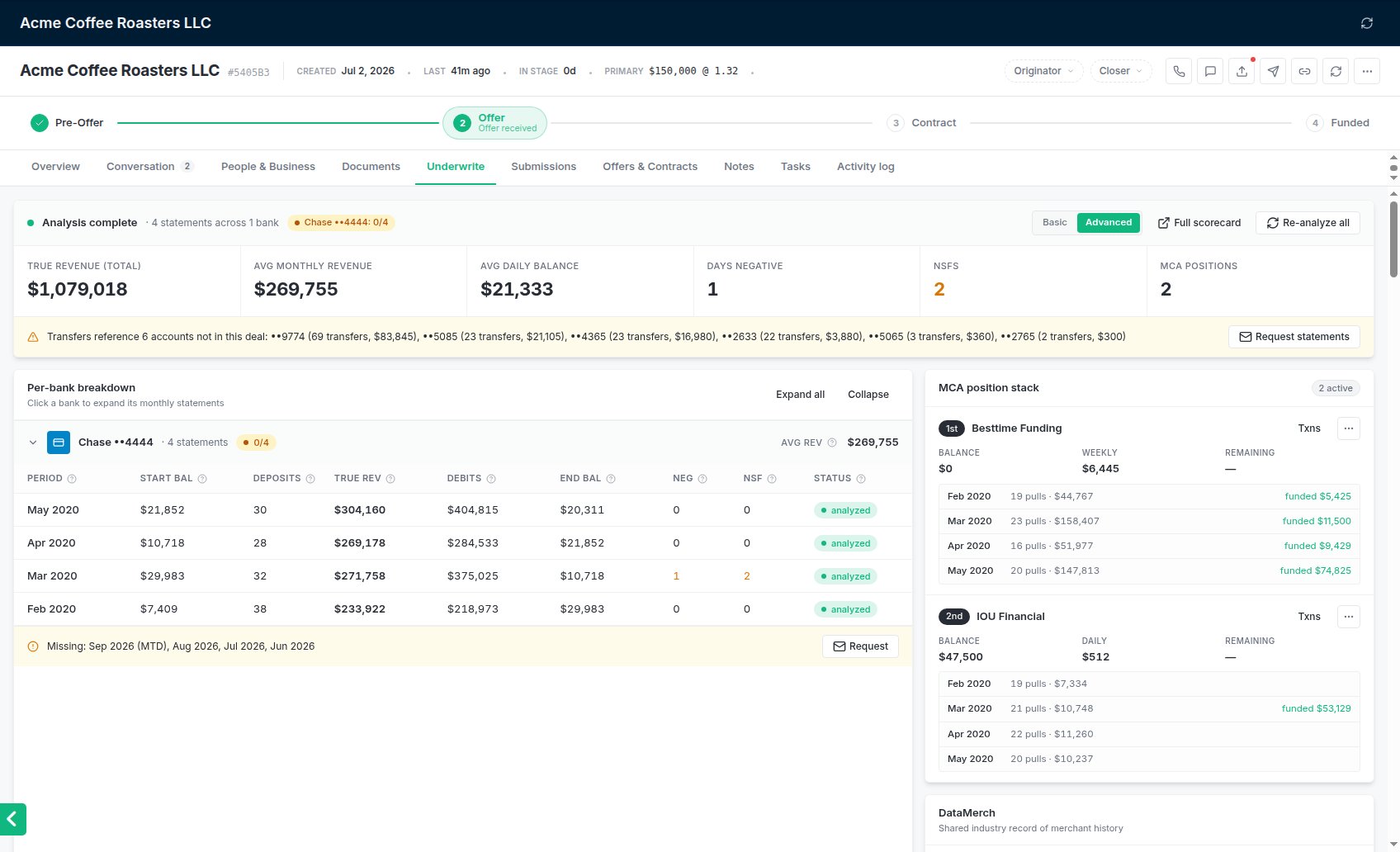
The **Underwrite** tab turns the bank statements on a deal into the numbers a lender asks about. This article explains what each part means. To get statements onto the deal and analyzed, see [Uploading bank statements](/help/upload-statements).
## The status line
The bar at the top says where the analysis is:
* **Not analyzed yet**: nothing has been sent for analysis.
* **Analyzing statements**: a run is in progress. The tab refreshes on its own and tells you when it's done.
* **Analysis complete**: with how many statements across how many banks, and a pill per bank account showing months you have against months required, for example *Chase ••1234: 3/3*.
* **Analysis failed**: try again with **Analyze new** or **Re-analyze all**.
The buttons on the right:
* **Analyze statements** sends every statement on the deal. After a first run it becomes **Analyze new (N)**, which sends only statements not analyzed yet.
* **Re-analyze all** redoes every statement from scratch and replaces the current result. Use it only when the result is wrong or the statements changed. It warns you first: statements analyzed in the last few weeks are re-analyzed at no cost, older ones are billed again.
* **Full scorecard** opens the full bank statement scorecard, when one is available.
* **Basic / Advanced** switches the view. See [Basic vs Advanced](/help/basic-vs-advanced).
If there's no Analyze button and the bar says **Bank statement analysis isn't set up for your account yet.**, analysis hasn't been set up for your account. See [Bank statement analysis](/help/bank-statement-analysis).
## The summary strip
Six numbers across all analyzed statements:
| Tile | What it means |
| - | - |
| **True revenue (total)** | Deposits that look like real business income. Transfers between the merchant's own accounts, advance fundings, refunds and returned items are left out. |
| **Avg monthly revenue** | True revenue per statement, averaged. |
| **Avg daily balance** | The average daily balance, averaged across statements. |
| **Days negative** | Days the balance was below zero. Amber when more than 5. |
| **NSFs** | Payments the bank bounced for insufficient funds. Amber when there are any. |
| **Open MCA positions** | Existing advances still being paid. |
Statements that couldn't be read are left out of these totals rather than counted as zero.
Two banners can appear under the strip:
* **Recovery activity detected**, in red, when money went to a collections or recovery company. A merchant paying a collector has usually defaulted somewhere.
* **Transfers reference N accounts not in this deal**, in amber: the merchant moves money to or from a bank account you don't have statements for. The banner names each account with the number and total of transfers. **Request statements** opens a document request so you can ask for them.
 ## Per-bank breakdown
One section per bank account, with the account's last four digits, its statement count, a coverage pill (for example **2/3**) and its average true revenue. Click a bank to open or close it; **Expand all** and **Collapse** do all of them.
Inside, one row per statement month: **Period**, **Start bal**, **Deposits** (how many deposits counted as revenue), **True rev**, **Debits**, **End bal**, **Neg** (negative days), **NSF** and **Status**. Hover the **?** beside a column header for what it means. Negative days and NSFs turn amber when there are any.
When months are missing for an account, an amber line says **Missing:** with the months, and **Request** opens a document request.
How many months are required is set in **Settings → General → Preferences**. See [Uploading bank statements](/help/upload-statements#check-you-have-enough-months).
## MCA position stack
The existing advances found in the statements, numbered in order (1st, 2nd, …). Each shows the funder, the **Balance**, the payment and how often it's taken, and the estimated **Remaining** term. The pill at the top counts open positions and turns red at three or more.
* **Txns** lists the payments behind a position.
* **…** → **Edit** changes the funder, balance, payment or frequency, when the merchant tells you something the statements don't show. **…** → **Remove** takes a position off the stack.
* A position the statements show as paid off is marked *Paid off per statements · not counted as a position*.
In the Advanced view each position also shows its monthly history: how many payments were pulled each month, and when it was funded.
## DataMerch, PACER and credit
The DataMerch card looks the merchant up in the industry's shared record of defaults and slow pays. See [DataMerch](/help/datamerch). The PACER card searches federal court records for bankruptcies and cases. See [PACER](/help/pacer). The Credit card soft-pulls each owner's credit from the bureaus your workspace uses. See [Credit pulls](/help/credit-pulls). Each card only shows when its integration is connected and switched on.
## Paper grade
The analysis feeds the deal's paper grade, A to D. A deal has no grade until its statements are analyzed. Lender matching uses the grade, and lenders can say which grades they take. See [Deals and the pipeline](/help/deals-and-pipeline#paper-grade).
## Related
* [Uploading bank statements](/help/upload-statements)
* [Basic vs Advanced](/help/basic-vs-advanced)
* [Why a duplicate statement is refused](/help/duplicate-statements)
* [Bank statement analysis](/help/bank-statement-analysis)
This documentation is built and hosted on [Mintlify](https://mintlify.com), a developer documentation platform.
## Per-bank breakdown
One section per bank account, with the account's last four digits, its statement count, a coverage pill (for example **2/3**) and its average true revenue. Click a bank to open or close it; **Expand all** and **Collapse** do all of them.
Inside, one row per statement month: **Period**, **Start bal**, **Deposits** (how many deposits counted as revenue), **True rev**, **Debits**, **End bal**, **Neg** (negative days), **NSF** and **Status**. Hover the **?** beside a column header for what it means. Negative days and NSFs turn amber when there are any.
When months are missing for an account, an amber line says **Missing:** with the months, and **Request** opens a document request.
How many months are required is set in **Settings → General → Preferences**. See [Uploading bank statements](/help/upload-statements#check-you-have-enough-months).
## MCA position stack
The existing advances found in the statements, numbered in order (1st, 2nd, …). Each shows the funder, the **Balance**, the payment and how often it's taken, and the estimated **Remaining** term. The pill at the top counts open positions and turns red at three or more.
* **Txns** lists the payments behind a position.
* **…** → **Edit** changes the funder, balance, payment or frequency, when the merchant tells you something the statements don't show. **…** → **Remove** takes a position off the stack.
* A position the statements show as paid off is marked *Paid off per statements · not counted as a position*.
In the Advanced view each position also shows its monthly history: how many payments were pulled each month, and when it was funded.
## DataMerch, PACER and credit
The DataMerch card looks the merchant up in the industry's shared record of defaults and slow pays. See [DataMerch](/help/datamerch). The PACER card searches federal court records for bankruptcies and cases. See [PACER](/help/pacer). The Credit card soft-pulls each owner's credit from the bureaus your workspace uses. See [Credit pulls](/help/credit-pulls). Each card only shows when its integration is connected and switched on.
## Paper grade
The analysis feeds the deal's paper grade, A to D. A deal has no grade until its statements are analyzed. Lender matching uses the grade, and lenders can say which grades they take. See [Deals and the pipeline](/help/deals-and-pipeline#paper-grade).
## Related
* [Uploading bank statements](/help/upload-statements)
* [Basic vs Advanced](/help/basic-vs-advanced)
* [Why a duplicate statement is refused](/help/duplicate-statements)
* [Bank statement analysis](/help/bank-statement-analysis)
This documentation is built and hosted on [Mintlify](https://mintlify.com), a developer documentation platform.