> ## Documentation Index
> Fetch the complete documentation index at: https://docs.nextlevelmca.com/llms.txt
> Use this file to discover all available pages before exploring further.
# What does the Lenders report show?
> How each lender treats what you send: reply rate and speed, offers and their terms, fundings, and why they decline.
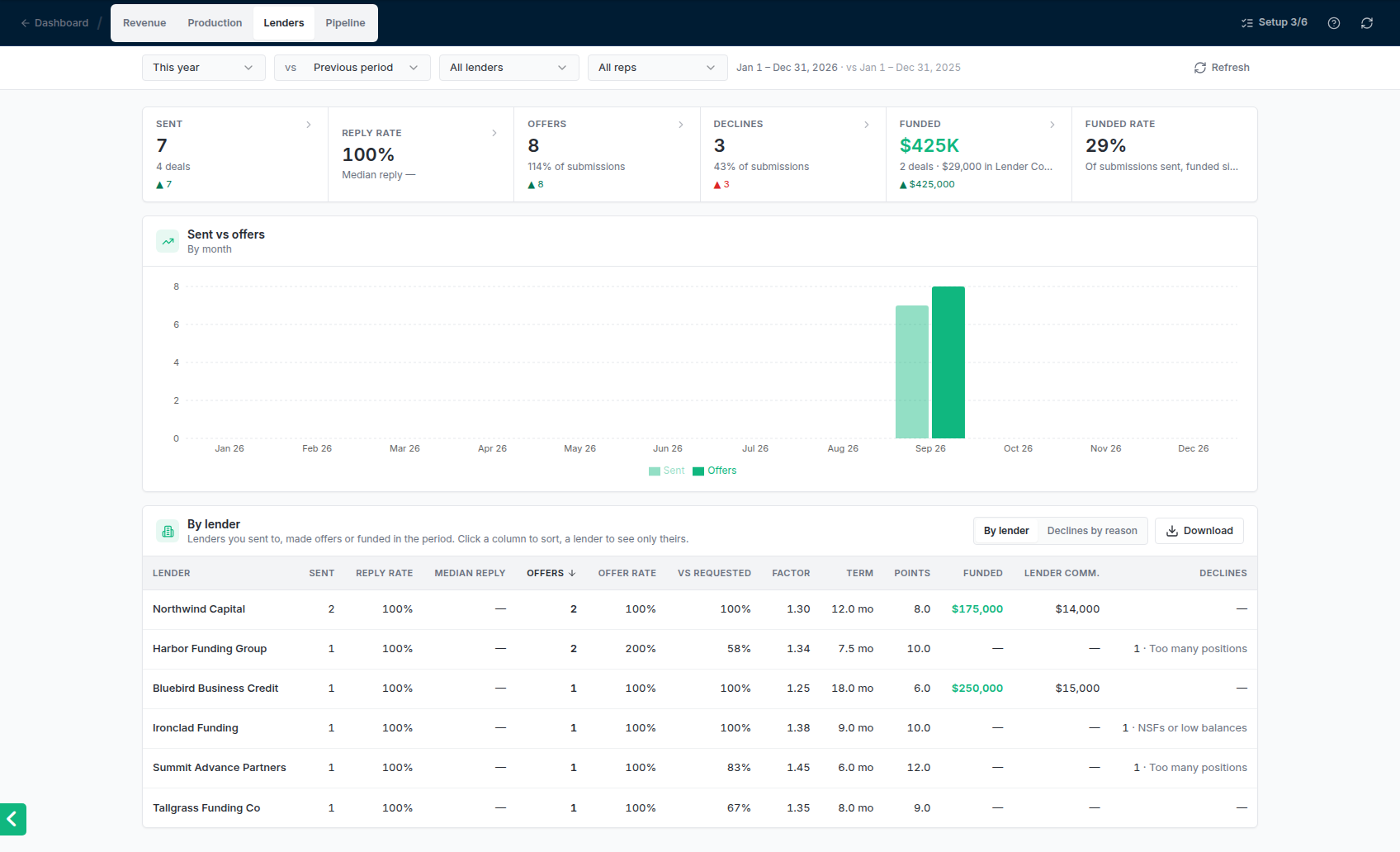
The Lenders report shows which lenders work for you: how often and how fast they answer, how many offers they make and on what terms, what they fund, and why they say no. Admins see the whole account. Managers see how lenders treated their reps' deals, without Lender Commissions.
Open it from the dashboard: **Business** tab → **Lenders** card → **See full report**. For the period, comparison, filters and downloads, see [Reports](/help/reports).
 ## The figures
| Figure | What it counts |
| - | - |
| **Sent** | Submissions that went to a lender in the period, and how many deals they were for. |
| **Reply rate** | Of those submissions, the share a lender answered (replied, approved, declined, asked for information or funded). Under it, the **median reply** time: half of the answers came faster than this. |
| **Offers** | Offers received in the period, as a share of the submissions sent. A revised offer doesn't count again. |
| **Declines** | Submissions sent in the period that were declined. |
| **Funded** | The amount and number of deals funded in the period. Admins also see the Lender Commissions on them. |
| **Funded rate** | Of the submissions sent in the period, the share that has funded since. |
Click a figure to list the submissions, offers or fundings behind it. The offers list shows each offer's amount next to what was requested, with its factor, term and points.
## By lender
One row per lender you sent to, got an offer from or were funded by in the period: **Sent**, **Reply rate**, **Median reply**, **Offers**, **Offer rate**, **Vs requested** (the average offer as a share of the amount requested), the average **Factor**, **Term** and **Points**, **Funded**, **Lender Comm.** (admins only) and **Declines** with the most common reason. Terms are averaged in months; daily terms are counted in business days.
* **Sort** by clicking a column heading; click again to reverse it. Median reply and factor put the lowest first, everything else the highest. Lenders with no value sit last either way.
* **Click a lender** to narrow the whole report to that lender. **All lenders** goes back.
* Lenders you've made inactive still show, marked **(inactive)**, when they had activity in the period.
## Declines by reason
Switch the table to **Declines by reason** to see why lenders turned down what you sent in the period. Each reason shows how many declines it covers and its share, with chips for the lenders giving it.
## The figures
| Figure | What it counts |
| - | - |
| **Sent** | Submissions that went to a lender in the period, and how many deals they were for. |
| **Reply rate** | Of those submissions, the share a lender answered (replied, approved, declined, asked for information or funded). Under it, the **median reply** time: half of the answers came faster than this. |
| **Offers** | Offers received in the period, as a share of the submissions sent. A revised offer doesn't count again. |
| **Declines** | Submissions sent in the period that were declined. |
| **Funded** | The amount and number of deals funded in the period. Admins also see the Lender Commissions on them. |
| **Funded rate** | Of the submissions sent in the period, the share that has funded since. |
Click a figure to list the submissions, offers or fundings behind it. The offers list shows each offer's amount next to what was requested, with its factor, term and points.
## By lender
One row per lender you sent to, got an offer from or were funded by in the period: **Sent**, **Reply rate**, **Median reply**, **Offers**, **Offer rate**, **Vs requested** (the average offer as a share of the amount requested), the average **Factor**, **Term** and **Points**, **Funded**, **Lender Comm.** (admins only) and **Declines** with the most common reason. Terms are averaged in months; daily terms are counted in business days.
* **Sort** by clicking a column heading; click again to reverse it. Median reply and factor put the lowest first, everything else the highest. Lenders with no value sit last either way.
* **Click a lender** to narrow the whole report to that lender. **All lenders** goes back.
* Lenders you've made inactive still show, marked **(inactive)**, when they had activity in the period.
## Declines by reason
Switch the table to **Declines by reason** to see why lenders turned down what you sent in the period. Each reason shows how many declines it covers and its share, with chips for the lenders giving it.
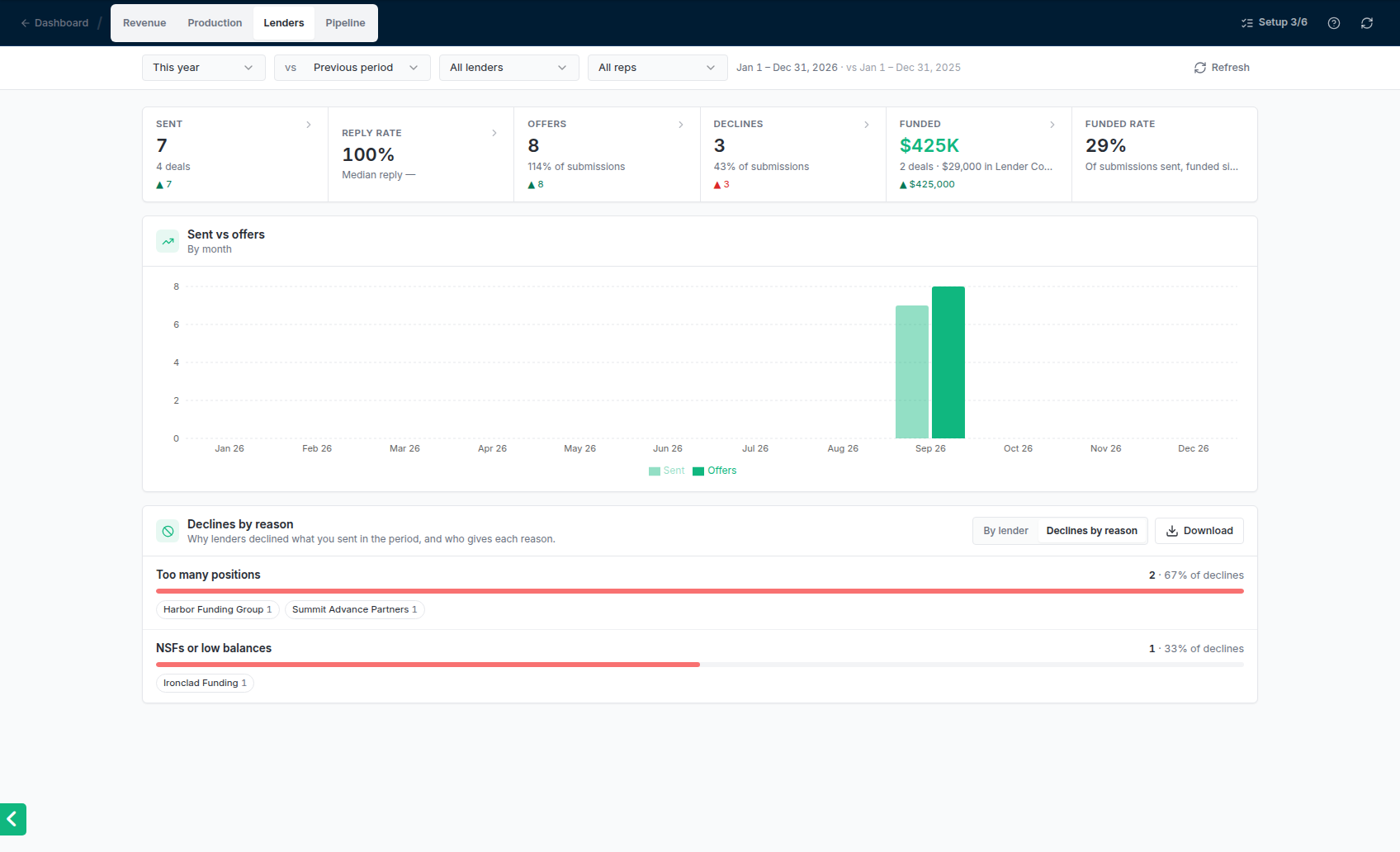 * Click a reason to list those declines. Hover over the reason in the list to read the lender's own words.
* Click a lender's chip to see only that lender's declines for that reason.
The reasons are: **Too many positions**, **Low revenue**, **NSFs or low balances**, **Time in business**, **Credit**, **Industry**, **State**, **Prior default or history**, **Documents**, **Amount requested**, **Other** and **No reason given**.
A decline gets its reason in one of two ways:
* **A lender's decline email** is read and filed under the reason it gives. A decline that doesn't say why is filed as **No reason given**. See [Replies and declines](/help/replies-and-declines).
* **Marking a submission declined yourself** asks you to pick the reason, and you can paste what the lender said.
## Common problems
No submission sent in the period has an answer yet, or the answers came with no reply time recorded.
The table lists lenders with a submission sent, an offer received or a funding in the period. Check the period at the top, and the **Lender** and **Rep** filters.
This documentation is built and hosted on [Mintlify](https://mintlify.com), a developer documentation platform.
* Click a reason to list those declines. Hover over the reason in the list to read the lender's own words.
* Click a lender's chip to see only that lender's declines for that reason.
The reasons are: **Too many positions**, **Low revenue**, **NSFs or low balances**, **Time in business**, **Credit**, **Industry**, **State**, **Prior default or history**, **Documents**, **Amount requested**, **Other** and **No reason given**.
A decline gets its reason in one of two ways:
* **A lender's decline email** is read and filed under the reason it gives. A decline that doesn't say why is filed as **No reason given**. See [Replies and declines](/help/replies-and-declines).
* **Marking a submission declined yourself** asks you to pick the reason, and you can paste what the lender said.
## Common problems
No submission sent in the period has an answer yet, or the answers came with no reply time recorded.
The table lists lenders with a submission sent, an offer received or a funding in the period. Check the period at the top, and the **Lender** and **Rep** filters.
This documentation is built and hosted on [Mintlify](https://mintlify.com), a developer documentation platform.